
Web design can be pretty tough to tackle, but it’s near impossible to do without structure, planning, and organization. Today, I am going to offer five helpful tips I’ve learned along my journey.
Tip 1: Plan your web design on paper first.
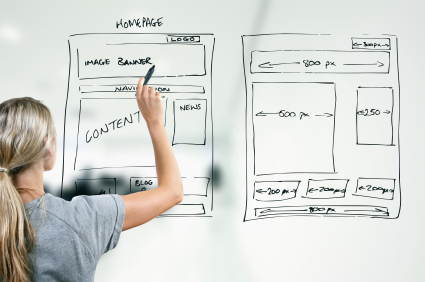
Create a basic outline for each of your pages and pencil out a rough structure of your site. This is important because it will help to visualize your site before you put in the effort of actually bringing the idea to fruition. Trust me when I say that erasing a pencil mark is much simpler than reworking the design on a web page!
Tip 2: Everything needs its own page.
Not EVERYTHING, but almost everything should have a separate page from the home page. Think of these as “doors” to your website. Not every user should have to take the same exact door to get in. Each individual service you offer should be a potential entryway into your site.
By having multiple landing pages, you multiply the chance of someone ending up on your website through their surf. It also reduces the amount of traffic on one particular page at a time, while maintaining the same amount of traffic overall.
Tip 3: Keep track of your content.
It is wise to keep a few lists on hand when designing your website:
For every page, you will need a link. A list of your main navigation links (e.g., Contact Us, Our Services, etc) can be a smart tool to have. It will help ensure you don’t forget any important pathways and can help keep you on track when you are tying up loose ends with your design.
What content do you plan on adding? You should make a list of content you need/want to add to your website. You can also use this to takes notes on where you want certain to go, which will make the process much less stressful.
Tip 4: Use practical categories.
According to web designer Jordan Dick, “If you were a landscaper offering different landscaping services like, ‘landscape lighting,’ ‘landscape design,’ etc., you’d want all those services under one category, on one tab of your main menu.
Chunking relevant content together in a logical way is imperative to a successful web design. The human brain already attempts to chunk information, so this can make a website very pleasing to the eye, but if you fail to do this, finding content specific to the user’s needs becomes increasingly more difficult.
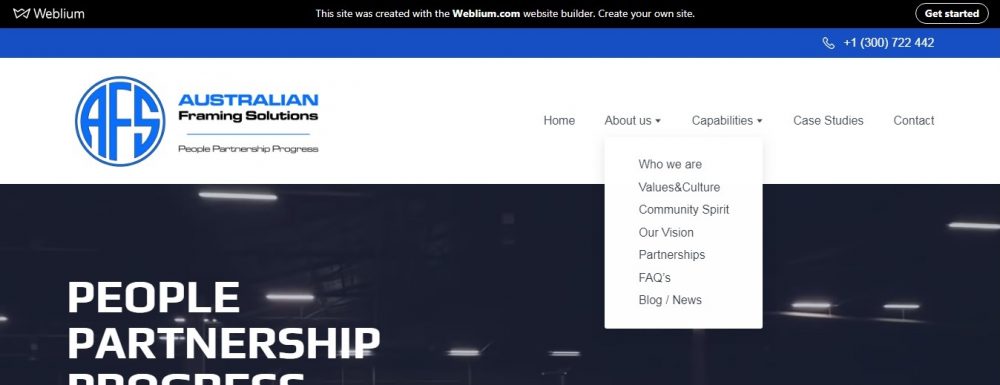
Making sure your content is properly categorized can help with the user’s ability to recall the area of interest within your website for back-tracking or future use.
Tip 5: Keep the main menu concise.
While the main menu of a website can be creative, there needs to be a direct reference in what the site’s primary purpose is.
A user shouldn’t be looking at your main menu and also thinking, “I wonder what this is all about?” Make sure it is obvious at a glance what the user is in for.
By staying organized and keeping track of your content, the road to a well-designed website instantly becomes a lot less bumpy. For more about information organization in web design, click HERE! (don’t worry, it’s not an ad).

 Sir Cinema