
Think about this: You are an aspiring voice actor. You have done some small roles, you put together a demo reel and you are ready to chase bigger jobs.
“How can I show that I am serious about pursuing a career in voice acting?” you ask. The answer? Create a website!
Creating a website used to be difficult to do unless you were well-read in coding and script-writing, but, thanks to programs like Weebly, that is no longer the case.
In my Digital Writing and Production class, we set up Weebly accounts. The goal of this is to design our own portfolios. The process was relatively simple and, since I have (absolutely) no experience with web design, I was very happy to find that the platform is very easy to use. Let me explain my experience.

What is Weebly?
Weebly is a tool designed to act as an interface on which you can make your very own website. It allows even the least experienced people design any kind of website they want.
Why use Weebly?
Weebly is easy to use, and you don’t have to break the bank to get something worth showing off. In fact, you can make a fully immersive website for free! It also has loads of features that make a web designer’s life much easier.
Some features include:
- Drag and drop website building makes the process as simple as picking a theme and dragging things where you want them to go.
- Responsive templates which are easy to edit and include pre-written, easy to change CSS and HTML.
- Device Switcher which allows you to simulate what your site will look like on different devices.
Also, lead designer at Weebly Wendy Ho had this little trick (mentioned in 5 Website Design Tips from a Weebly Expert) to help even more:
“You can move, copy or delete a lot of things at once: Click the column that divides elements, then click the arrow on the left to copy or the ‘x’ on the right to delete the entire group.”
While Weebly is, overall, simple to use, it can be a useful tool for people learning web design. It still requires some knowledge of HTML and CSS to take full advantage of the customization available, which makes Weebly great to use (as my class is) as a tool to learn how to write custom code.
My Weebly Site
I am in the very early stages of creation.
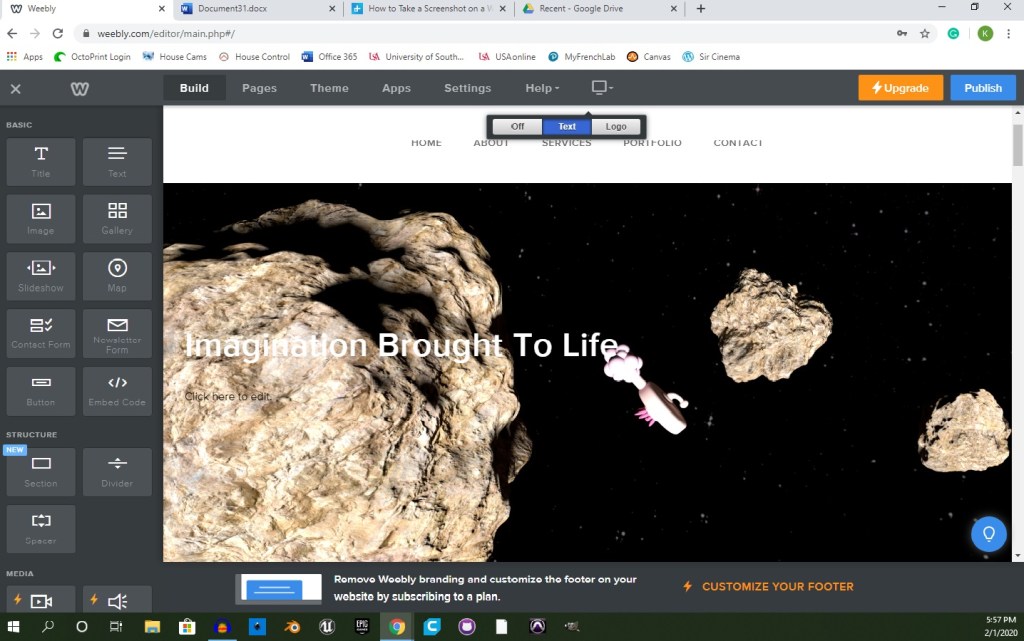
When creating my website on Weebly, I decided to use Typo Designs – Cento 2 as my theme. It is a dark theme, using mostly black with red highlights and white text. I chose this theme because it was the first to pop out at me. I typically do things with a sense of spontaneity, but I also liked the sense of serious confidence that it portrayed. While I do enjoy the theme, overall, I will probably change the layout of the site to better suit my art portfolio.
 Sir Cinema